Chez scarecrowang

scarecrowang's personal blog !


  • Home

  • Archives

Hexo博客多终端同步

Posted on 2018-08-26 | In HEXO

使用Github搭建了个人博客之后,本想随时记录工作中的问题。但是因为Hexo本地编辑,远程部署。所以如果要想达到“随时记录”,还需要做一些在多终端同步的工作。

思路:

通过github的分支,把本地的Hexo源文件推送到github的分支上进行管理。如果要在新的终端上维护更新博客,先和远程的分支同步,然后再推送+部署。

步骤:

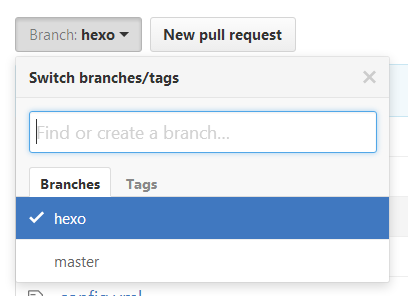
  • 先在远程仓库新建一个branch,比如hexo

新建hexo分支

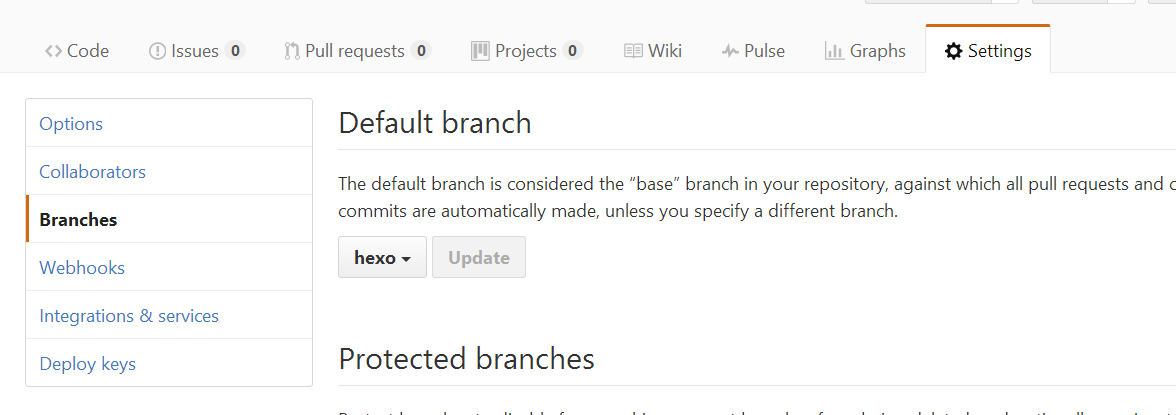
  • 接着将hexo的分支设为默认,

设置成默认分支

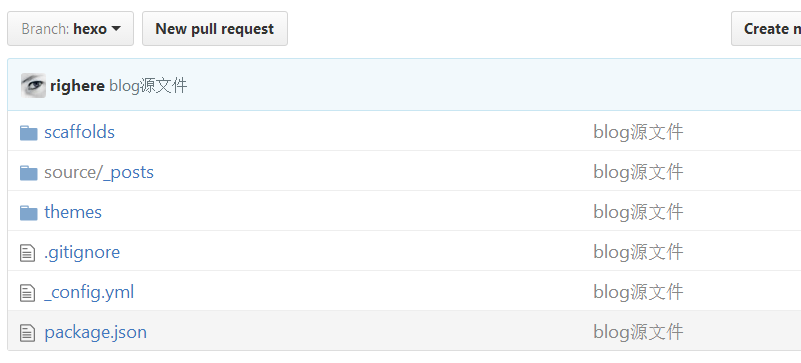
  • 将源文件上传到hexo分支

    注意这里有个巨大的坑!!!如果你用的是第三方的主题theme,是使用git clone下来的话,要把主题文件夹下面把.git文件夹删除掉,不然主题无法push到远程仓库,导致你发布的博客是一片空白

初始化本地仓库:

git init

添加本地所有文件到仓库:

git add -A

添加commit:
git commit -m "blog源文件"

添加本地仓库分支 hexo:
git branch hexo

添加远程仓库:
git remote add origin git@github.com:yourname/yourname.github.io.git

将本地仓库的源文件分支hexo强制推送到远程仓库hexo分支:
git push origin hexo -f

上传完成

上传完成之后,我们就拥有了两个远程的分支:master和hexo, 其中master是部署成博客的分支; hexo是我们可以clone到其他电脑或者其他系统的hexo源文件的分支,而且我们已经将它设置成默认仓库;

  • 在其他电脑设备上执行clone远程仓库的hexo分支clone到本地

git clone -b hexo git@github.com:yourname/yourname.github.io.git

进入本地仓库执行hexo安装: npm install

  • 编辑本地的blog之后,编辑发布博客

依次执行 git add., git commit -m "改了啥", git push origin hexo, 同步本地仓库到远程

部署发布博客: hexo g, 这样就生成静态网页部署到了github中

Hello World

Posted on 2018-08-26

Welcome to Hexo! This is your very first post. Check documentation for more info. If you get any problems when using Hexo, you can find the answer in troubleshooting or you can ask me on GitHub.

Quick Start

Create a new post

1
$ hexo new "My New Post"

More info: Writing

Run server

1
$ hexo server

More info: Server

Generate static files

1
$ hexo generate

More info: Generating

Deploy to remote sites

1
$ hexo deploy

More info: Deployment

PHP获取header信息

Posted on 2017-10-19 | In PHP

之前在Egret工作的时候,需要和合作伙伴的接口做对接。某次需要从对方传过来的header信息中获取自己需要的数据,用PHP封装了一个方法,放这里留着以后用。

1
2
3
4
5
6
7
8
9
10
11
12
13
14
15
16
17
18
19
20
21
22
23
24
25
26
27
28
29
30
31
32
33
34
35
36
37

function get_head($sUrl){
$oCurl = curl_init();
$header[] = "Content-type: application/x-www-form-urlencoded";
$user_agent = "Mozilla/5.0 (Windows NT 6.1) AppleWebKit/537.36 (KHTML, like Gecko) Chrome/33.0.1750.146 Safari/537.36";

curl_setopt($oCurl, CURLOPT_URL, $sUrl);
curl_setopt($oCurl, CURLOPT_HTTPHEADER,$header);
curl_setopt($oCurl, CURLOPT_HEADER, true);
curl_setopt($oCurl, CURLOPT_NOBODY, true);
curl_setopt($oCurl, CURLOPT_USERAGENT,$user_agent);
curl_setopt($oCurl, CURLOPT_RETURNTRANSFER, 1 );
curl_setopt($oCurl, CURLOPT_POST, false);

$sContent = curl_exec($oCurl);
$headerSize = curl_getinfo($oCurl, CURLINFO_HEADER_SIZE);
$header = substr($sContent, 0, $headerSize);

curl_close($oCurl);

return $header;
}

//header头信息
$baiduUrl = "http://www.baidu.com/link?url=LZE_J6a1AcieLlTzNxUZQVpe2trQ99zx1ls85ux8dXaGlFB3eiEm_Y6SJC1sNQf_";
$responseHead = get_head($baiduUrl);
print_r('Header: '.$responseHead.'</br></br></br>');


//获取location
$headArr = explode("\r\n", $responseHead);
foreach ($headArr as $loop) {
if(strpos($loop, "Location") !== false){
$edengUrl = trim(substr($loop, 10));
print_r('Location: '.$edengUrl);
}
}

Hello Hexo

Posted on 2017-10-15

Hello everybody! Welcome to my personal blog powered by Hexo which is a cool product. I hope I can share my opinions and my skills here and make friends with you.

scarecrowang

This blog is my personal blog. It will focus on the techonlogy of Inernet.

4 posts
2 categories
2 tags
© 2018 scarecrowang
Powered by Hexo
|
Theme — NexT.Muse v5.1.4